TVH: OP Training

Author: Kathleen Chan Kathleen Chan

  • When to pivot: How to build a strategic mindset in uncertain times

    When to pivot: How to build a strategic mindset in uncertain times

    It’s time to stop reacting and start leading with a strategic mindset

    Scaling a business is tough enough—doing it during a crisis? That’s a whole different level. If you’re a founder or operator who feels like you’re sprinting just to stand still, you’re not alone.

    Here’s the hard truth: If you want to move from survival mode to growth mode, you need more than hustle. You need a strategic mindset.

    Because how you think right now determines how your business shows up next. And whether it moves forward—or folds.


    Why strategic thinking beats reactive hustling

    Let’s face it. Adrenaline doesn’t build resilient businesses—strategy does.

    We’ve all seen the headlines: “Now’s the time to pivot!” “Reinvent everything!” “Learn to code! Bake sourdough! Launch a Shopify store!”

    But this isn’t the time for knee-jerk pivots. It’s the time for deliberate, clear-eyed strategy. A pivot in business only makes sense when it’s backed by intentional thinking and calm execution—not panic.


    Step 1: Reset before you react

    You can’t make clear business decisions when your nervous system is fried. This isn’t soft advice—it’s strategy.

    The best founders know when to hit pause and recalibrate. That might be a run, a meditation session, or—if you’re like our founder Barbara—multiple stress-showers a day.

    Find your personal “reset switch,” and use it as often as needed. You’re not wasting time—you’re buying clarity.

    Helpful Resource: Try Valerie Friedlander’s Reset Quiz to identify your stress-releasing style. Your mental clarity depends on it.


    Step 2: Control what you can. Ruthlessly.

    You can’t control the economy. But you can control your inputs. What you watch, read, focus on—and how you lead your team.

    At The Virtual Hub, we teach founders to build repeatable systems, delegate fast, and stay focused on high-leverage work. That all starts with one thing: mental discipline.

    Start by reducing noise. Cut the doom-scrolling. Clean your workspace. Own your calendar. Focus on what actually moves the needle.

    Step 3: Plan your pivot (don’t wing it)

    Once you’ve reset and regained control, you’re now ready to assess whether a pivot is necessary.

    Ask yourself:

    • What’s still selling in this market?
    • What pain points are emerging?
    • Where can we serve—better, faster, or differently?

    At The Virtual Hub, we re-examined our entire offering. That meant doubling down on elite VA training for eCommerce, podcasting, membership site management, and community building—because that’s where our clients needed the most support.

    We didn’t change what we did. We sharpened how we did it.

    That’s what a strategic pivot looks like.


    Step 4: Shift your mindset from “operator” to “optimiser”

    Right now, your business doesn’t need more of your effort—it needs more of your strategic clarity. That starts with auditing where your energy goes.

    Are your best people bogged down in admin? Are you answering emails instead of steering growth? Then it’s time to implement a support layer—so your top minds can work on what matters.

    That’s where The Virtual Hub comes in. We integrate elite support assistants into your business to remove bottlenecks and drive momentum. Fast.


    Bonus: How we’re pivoting at The Virtual Hub

    Even as a virtual business, we were impacted. Clients pulled back. Budgets tightened. We had a choice: cut back or level up.

    We chose to invest. In our training programs. In our people. In new service lines aligned to where our clients are heading—not where they’ve been.

    Here’s what we’re doing:

    • Building VA training for high-growth platforms (e.g., Shopify, Kajabi, Circle, podcasts)
    • Creating better onboarding systems and faster deployment
    • Doubling down on our promise: powering performance through frictionless support

    We’re not just adapting—we’re optimising.


    Conclusion: Think like a strategist, act like a founder

    If you’re stuck in firefighting mode, here’s your signal: step back, reset, and lead.

    The businesses that come out of this stronger are led by founders who choose strategy over stress. Who knows when to pivot—and when to hold firm.

    This is your moment to build a business that doesn’t just survive uncertainty, but thrives because of it.


    GET IN TOUCH

  • The Ultimate Guide to Living in Fantasia Lane

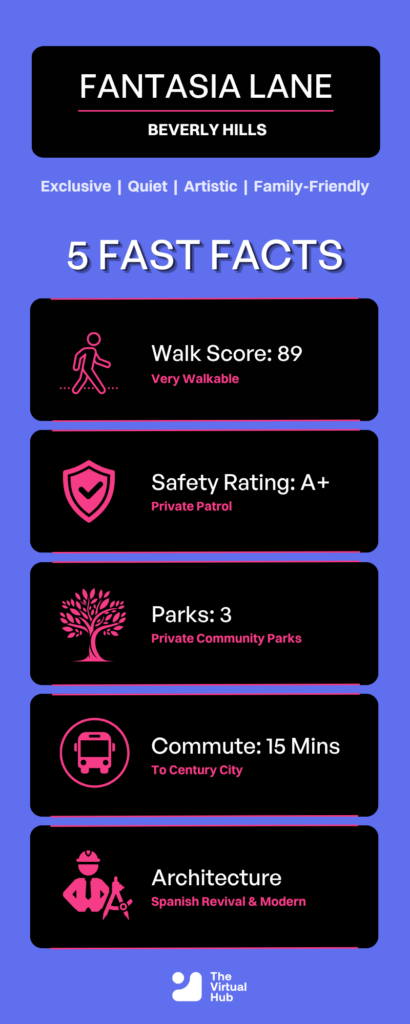
    Nestled just north of Sunset Blvd, Fantasia Lane isn’t just a street; it’s a lifestyle. Known for its canopy of Jacaranda trees and estates dating back to the 1920s, this enclave offers the perfect blend of privacy and proximity. Whether you’re a tech mogul or a growing family, here is why everyone is trying to buy into this zip code.

    Market Stats

    Average Home Price$4,200,000
    Average Price Per SqFt$1,100
    Average Days on Market14 Days
    Year-Over-Year Growth+8%

    At a Glance

  • Kathleen Chan – How Often Should You Talk to Your Virtual Assistant?

    Kathleen Chan – How Often Should You Talk to Your Virtual Assistant?

    One of the most common questions business owners ask when managing a virtual assistant (VA) is: How often should I talk to my VA?

    While it sounds like a question about frequency, the real issue is often much deeper. Effective remote team management isn’t about counting meetings or messages; it’s about creating a communication system that fosters clarity, trust, accountability, and connection.

    In a traditional office, communication happens naturally through hallway conversations, quick check-ins, and face-to-face interactions. In a remote environment, those moments disappear. Without intentional communication, misunderstandings grow, engagement declines, and productivity suffers.

    Here’s what leaders need to know about building strong communication rhythms with virtual assistants and remote teams.


    Why Communication Matters More in Remote Teams

    Silence Is Not a Sign Everything Is Fine

    One of the biggest mistakes remote leaders make is assuming that a quiet team means a productive team. In reality, silence can often signal:

    • Uncertainty about priorities
    • Lack of confidence
    • Misunderstood instructions
    • Disconnection from the team
    • Unreported blockers

    When communication decreases, initiative often decreases as well. Team members become hesitant to make decisions and may focus more on avoiding mistakes than producing great work.

    The Remote Leadership Rule: Proactive communication is non-negotiable. Waiting for problems to surface often means addressing them too late.

    Remote Teams Need Communication by Design

    In a physical office, communication happens organically. Team members see each other throughout the day, ask questions casually, and receive constant feedback through small interactions.

    Remote work is different. Successful virtual teams rely on intentionally designed communication systems that replace those natural touchpoints. Leaders must create opportunities for alignment, feedback, and connection rather than assuming they will happen automatically.

    Communication should be treated as an operating system, not an afterthought.


    Creating Communication Protocols That Reduce Confusion

    Communication

    Not Every Message Belongs in the Same Place

    One challenge many remote teams face is communication overload. Important information becomes buried beneath random messages, emails, and notifications. Establishing clear communication channels helps eliminate confusion.

    • Quick Updates: Use messaging platforms such as Slack or Microsoft Teams for status updates, short questions, and team announcements.
    • Task-Specific Communication: Use project management tools such as Asana or ClickUp for assignments, deadlines, project progress, and documentation.
    • Calls and Meetings: Reserve meetings for decision-making, complex discussions, feedback conversations, and strategic planning.
    • Video or Screen Recordings: Use tools like Loom for visual explanations, demonstrating processes, providing detailed instructions, or reviewing technical tasks.

    A structured communication framework helps teams move faster while reducing unnecessary interruptions.

    Clarity Prevents Misunderstandings

    Written communication can easily be misinterpreted without context. Simple adjustments can improve clarity significantly:

    • State expectations clearly
    • Explain the purpose of a conversation
    • Provide context alongside requests
    • Confirm understanding when discussing important tasks

    The goal is not simply to communicate more often, but to communicate more effectively.


    Building a Communication Rhythm That Works

    Establish Consistent Check-Ins

    Strong remote teams operate with predictable communication rhythms. One effective approach is the daily huddle, a brief meeting focused on three questions:

    1. What was completed yesterday?
    2. What is the priority today?
    3. Are there any blockers?

    These conversations help teams stay aligned, surface issues early, and maintain accountability. Consistency is always more important than complexity.

    Match the Rhythm to the Role

    Consistency

    Different roles require different levels of communication.

    RoleSuggested Rhythm
    Executive AssistantDaily check-ins
    Operations SupportDaily or several times weekly
    Content Team MembersWeekly or twice-weekly meetings
    Project-Based ContractorsMilestone-based updates

    The key is to ensure the rhythm supports the work rather than disrupts it.

    Review and Adjust Over Time

    Communication systems should evolve as relationships mature.

    During onboarding, more frequent communication helps establish trust and alignment. As confidence grows, teams may transition to fewer meetings supported by asynchronous updates. Leaders should regularly ask:

    • Is our communication rhythm still working?
    • Are misunderstandings increasing?
    • Do team members feel supported?
    • Are blockers being surfaced quickly?

    Periodic adjustments keep communication effective as the business grows.


    Creating an Escalation Framework

    Define What Is Truly Urgent

    One challenge in remote teams is knowing when an issue requires immediate attention. Without clear guidelines, team members often hesitate to escalate problems or escalate everything.

    An effective solution is to define urgency levels:

    • Category A (Handle Independently): Routine decisions that do not require leadership involvement.
    • Category B (Discuss Together): Issues that require collaboration or additional guidance during the next check-in.
    • Category C (Immediate Escalation): Critical situations requiring immediate attention regardless of schedules or time zones.

    When expectations are clearly documented, team members can act confidently without second-guessing themselves.


    Why Overcommunication Is Often a Leadership Strength

    Clarity Beats Assumptions

    Many problems in remote teams are not caused by poor performance. They are caused by assumptions.

    • “I thought you meant something different.”
    • “I didn’t know that was urgent.”
    • “I wasn’t aware that task was assigned to me.”

    These issues are communication failures, not capability failures. The solution is repetition, clarification, and confirmation. High-performing remote teams reinforce important information through multiple touchpoints: meetings, written documentation, task management systems, and follow-up communication.


    What Real Leadership Looks Like in a Virtual Environment

    Leadership

    Effective remote leadership is not about constant oversight; it is about creating clarity, connection, and consistency.

    Strong virtual leaders:

    • Show up consistently
    • Maintain communication rhythms
    • Provide context and feedback
    • Encourage questions
    • Create clear escalation paths
    • Ensure team members feel seen and supported

    Even short, intentional interactions can strengthen engagement and trust. When communication becomes part of the team’s operating system, remote work becomes more productive, collaborative, and sustainable.


    Key Takeaways

    If you’re wondering how often you should talk to your virtual assistant, the answer is simple: Probably more than you currently are.

    Success in remote teams doesn’t come from more meetings or more messages. It comes from intentional communication systems that create clarity, accountability, and connection. Start with a simple rhythm, communicate consistently, and refine your approach over time. The result will be a more engaged team, fewer misunderstandings, and stronger long-term performance.

  • Why Hiring a Marketing Virtual Assistant is the Smartest Move for Scaling Founders

    Why Hiring a Marketing Virtual Assistant is the Smartest Move for Scaling Founders


    Scaling But Swamped? Here’s How a Marketing Virtual Assistant Can Help

    You’re growing—but your to-do list is growing faster. If digital marketing is draining your time or falling through the cracks, you’re not alone. Hiring a marketing virtual assistant might be the best operational move you haven’t made yet.

    From content and campaigns to data and design, marketing VAs are the ultimate digital marketing support system—minus the overhead. If you’re a time-poor founder or operations lead looking to scale fast and smart, here’s what you need to know.


    What Does a Marketing Virtual Assistant Actually Do?

    Think of a marketing VA as your behind-the-scenes growth engine. They’re not just task-takers—they’re performance partners, capable of executing high-impact initiatives across your marketing stack.

    Common responsibilities include:

    • Social media scheduling, engagement & influencer outreach
    • Blog and content creation
    • Email campaign setup and management
    • Website and SEO maintenance
    • Ad copywriting, performance tracking, and light graphic design
    • CRM, list segmentation, and analytics reporting
    • Project and calendar management

    And because they work remotely, hiring is flexible, efficient, and completely scalable to your pace of growth.


    The Benefits of Hiring a Marketing Virtual Assistant

    Save Time and Get Out of the Weeds

    Running marketing in-house when you’re already juggling sales, ops, and delivery? Not sustainable. A VA handles the grunt work—content calendars, email builds, social posts—so you stay in your zone of genius.

    Smart Cost Efficiency Without Compromise

    Forget fixed salaries, desk space, or expensive freelancers. Marketing VAs work on hourly or project-based contracts, giving you expert execution without overhead. You only pay for outcomes.

    Higher Quality, Delivered Consistently

    Marketing VAs are trained in best practices and current trends. They know how to build campaigns that convert—and they bring that discipline into your workflows.

    More Order, Less Chaos

    From managing campaign schedules to setting up automations, VAs bring structure. That means more consistency, cleaner data, and fewer last-minute scrambles.

    Fresh Eyes, Modern Strategies

    VAs are exposed to tools, clients, and industries daily. That cross-pollination brings perspective—and often better, sharper strategies than in-house generalists can deliver.


    Operational Perks That Compound Over Time

    Flexible Resourcing for Any Season

    Scale up for launches or slow down in off-seasons—without the hassle of hiring and firing. VAs provide just-in-time support that grows with your business.

    Increased Productivity and Performance

    Marketing VAs don’t just do tasks—they enable performance. From reporting and segmentation to copy and creative, they streamline your team’s output and deliver results.

    24/7 Brand Visibility

    Your VA can work across time zones, respond to customer queries, and keep your marketing engine running while you sleep.


    Tactical Marketing Support – Done For You

    • Blog Management – From topic research to SEO optimization and publishing
    • Website Maintenance – Plugin updates, analytics, mobile optimization
    • Lead Nurture & Conversion – Emails, landing pages, follow-ups
    • Social Media Execution – Scheduling, interaction, trend monitoring
    • Graphic Design & Creatives – Branded assets, visuals, and templates
    • Search & PPC Campaigns – Strategy execution, ad copy, performance tracking
    • Data & Analytics – From Google Analytics to custom dashboards
    • Email Marketing – List management, segmentation, newsletters

    Make Time for What Really Matters

    Hiring a marketing virtual assistant is more than a tactical choice— it’s a strategic lever. You get bandwidth back, marketing momentum, and a dependable partner who gets it done.

    Whether you’re building your brand, growing leads, or scaling operations, this is how high-growth companies stay lean, focused, and competitive.


  • What Does a Virtual Assistant Do? (And Why It Could Be the Smartest Hire You Make This Year)

    What Does a Virtual Assistant Do? (And Why It Could Be the Smartest Hire You Make This Year)


    You’re drowning in admin, your inbox owns you, and strategic projects are stalling. Sound familiar? Then you’re not alone. Founders and operators in scale mode often hit the same wall: you can’t grow if you’re stuck running the business.

    That’s where virtual assistants come in—but not the ones you hire off freelance marketplaces with zero support. We’re talking about elite support assistants who integrate directly into your operations, take ownership of tasks, and free your team to focus on what moves the needle.

    In this guide, we break down exactly what a virtual assistant does, how they can transform your business, and what smart scaling companies do differently when it comes to delegation.


    What Is a Virtual Assistant?

    A virtual assistant (VA) is a remote professional who provides operational, administrative, or specialized support services to businesses. But not all VAs are created equal. At The Virtual Hub, our assistants are part of a fully integrated support layer—trained, coached, and embedded in your business with one goal: to power performance.

    Key Difference: Plug-in Productivity vs Freelance Chaos

    Most virtual assistants are recruited from platforms with little to no training. At The Virtual Hub, we hire the top 1%, run them through 22,000+ hours of proprietary training, and assign them in Performance Pods for frictionless support.

    Virtual Assistant Duties: What Can They Actually Do?

    Whether you’re a time-poor founder or a COO under pressure to streamline, virtual assistant services can help you stay focused on the big picture. Here’s what a high-calibre VA can do:

    Admin & Operational Tasks

    • Calendar & inbox management
    • Travel booking and expense tracking
    • Data entry, CRM updates, file management
    • Customer support & service desk triage

    Marketing Support

    • Social media scheduling and engagement
    • Content upload and basic blog formatting
    • CRM setup and maintenance (e.g. HubSpot, ActiveCampaign)
    • Reporting dashboards (e.g. Google Analytics, Power BI)

    Systems & Process Work

    • SOP creation and documentation
    • Workflow optimization in tools like Asana or ClickUp
    • Light automation setups (e.g. Zapier integrations)

    Research & Reporting

    • Market and competitor research
    • Lead generation list building
    • Executive reporting & slide deck formatting

    Content & Digital Support

    • Proofreading and formatting documents
    • Publishing blog posts and web pages
    • Repurposing long-form content into bite-sized social snippets

    Virtual Assistant vs Personal Assistant vs Admin Assistant

    Here’s how they stack up:

    • Virtual Assistant: Remote, task-driven, scalable. Best for businesses wanting operational efficiency without adding headcount.
    • Personal Assistant: Often supports one person with both work and personal admin.
    • Admin Assistant: Typically in-office and more reactive.
    • Executive Assistant: High-level calendar, project, and comms management, usually for senior execs.

    With the right training and systems, a virtual assistant can cover many of these roles—at a fraction of the cost.


    The Virtual Hub Difference: Support That Scales With You

    Most businesses fail at delegation, not because they don’t have help, but because their help isn’t trained, integrated, or aligned.

    We fix that.

    How We Do It:

    • Top 1% Talent: We hire for smarts, integrity, and attitude.
    • Custom Training Roadmaps: Designed for your business, not generic tasks.
    • Performance Pods: Your VA is backed by a Client Success Manager and Results Coach to ensure alignment and output.
    • System & Process Experts: We don’t just place VAs. We optimise your operations to scale.

    Explore our full VA services and find out how we help businesses plug in elite support without the recruitment roulette.


    Benefits of Hiring a Virtual Assistant

    When you integrate the right virtual assistant, the ROI is clear:

    1. Time Reclaimed

    Founders reclaim 10–20+ hours/week to focus on vision, growth, and leadership.

    2. Cost Efficiency

    Our support layer model delivers outcomes at 1/3 the cost of hiring locally.

    3. Scale With Flexibility

    No long-term contracts. Scale up or down based on business demand.

    4. Stress Reduction

    Delegate the chaos. Sleep better knowing execution is handled.

    5. Team Performance Boost

    Free your high-value team members from low-value tasks.


    What Does a Virtual Assistant Cost?

    We offer simple, all-inclusive pricing starting at $1800 USD/month for 40 hours per week. That includes full onboarding, training, and pod support. No hidden fees. No HR headaches.

    Still considering doing it alone? You’ll spend more on recruiting, training, and managing than you will on simply partnering with us.


    How to Hire a Virtual Assistant (The Right Way)

    You have two options:

    Option 1: DIY (Not Recommended)

    • Write a job ad
    • Post on freelance platforms
    • Sift through 100s of unvetted resumes
    • Onboard, train, and hope for the best

    Option 2: Partner with The Virtual Hub

    • Discovery Call: Let’s understand your needs
    • VA Match: Meet 2–3 pre-trained, pre-vetted candidates
    • Onboard with a Pod: Support and coaching from day one

    Book a Discovery Call to skip the guesswork and meet your new favourite hire.


    Conclusion: So, What Does a Virtual Assistant Really Do?

    A high-performance VA does more than tick boxes. They create leverage. They integrate into your operations, handle the work that blocks your best people, and give you the capacity to scale.

    At The Virtual Hub, we don’t just give you a VA—we plug in a support layer that drives operational efficiency and frees your business to move faster.

    External Links: